Shopify Development
Shopify Outage Readiness Checklist 2026: How Stores Should Prepare for Checkout, POS, and Admin Incidents
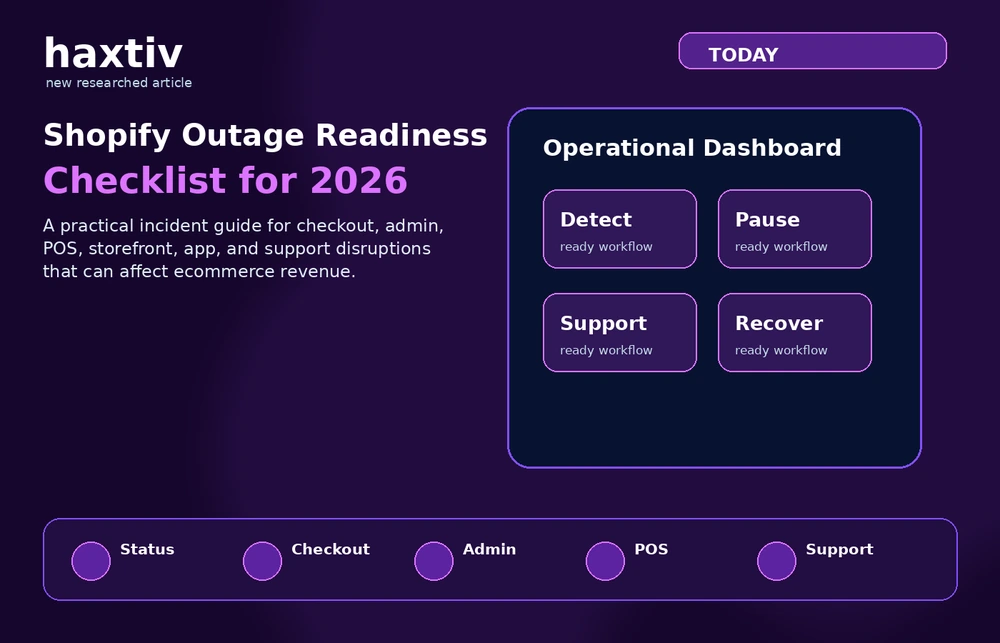
A practical news-plus-checklist guide for Shopify, WooCommerce, and WordPress merchants preparing for checkout, admin, POS, storefront, app, and support incidents.
Shopify Outage Readiness Checklist 2026: How Stores Should Prepare for Checkout, POS, and Admin Incidents
Key takeaways
- Recent Shopify status reports show that platform incidents can affect admin access, Shopify POS, storefronts, checkout, and support access at the same time.
- A Shopify outage is not only a technical event. It affects customer support, paid campaigns, fulfillment, retail teams, social media, analytics, and finance reconciliation.
- Merchants should prepare an incident playbook before the next outage: status monitoring, communication templates, campaign pause rules, order reconciliation, checkout testing, and post-incident analysis.
- WordPress and WooCommerce teams need a similar readiness mindset because hosting, plugins, payment gateways, and database issues can create store-level incidents even when the platform itself is fine.
- The best readiness work overlaps with <a href="https://haxtiv.com/services/shopify-support">Shopify support</a>, <a href="https://haxtiv.com/services/shopify-maintenance">Shopify maintenance</a>, <a href="https://haxtiv.com/website-maintenance-services">website maintenance services</a>, technical SEO, and conversion-rate optimization.
Why this topic matters today
Ecommerce teams often plan for campaign launches, redesigns, product drops, and conversion tests. Fewer teams plan for platform disruption. That is risky because modern stores rely on connected systems: storefronts, checkout, POS, apps, payment gateways, admin access, analytics, email tools, support desks, inventory sync, and fulfillment workflows.
Shopify's own status page recently described an infrastructure issue that caused errors across Shopify admin, Shopify POS, storefront, and checkout, while also affecting access to Shopify Support. That kind of incident is not something a merchant can fully prevent. But merchants can prepare for how they monitor, communicate, pause campaigns, protect customers, and reconcile orders afterwards.
For Haxtiv, this belongs in the same family as <a href="https://haxtiv.com/shopify">Shopify development</a>, <a href="https://haxtiv.com/services/shopify-speed-optimization">Shopify speed optimization</a>, <a href="https://haxtiv.com/services/shopify-seo">Shopify SEO</a>, and store care. A store is not healthy only because it looks good. It is healthy when the team knows what to do when checkout, admin, POS, or apps misbehave.
The first mistake: treating outages as rare surprises
Outages are not everyday events, but they are normal enough that growing stores should plan for them. A platform like Shopify is highly reliable, but no platform is immune to infrastructure incidents. WordPress and WooCommerce stores face a different version of the same risk: hosting failures, plugin conflicts, cache mistakes, bad updates, payment-gateway problems, malware, or database overload.
The practical lesson is not to avoid Shopify or avoid WooCommerce. The lesson is that every commerce system needs an incident process. The process should be short enough that a founder, ecommerce manager, developer, or customer-support lead can follow it under pressure.
A good outage plan answers who checks official status, who pauses ads, who updates customer support, who reviews checkout health, who watches social channels, who checks orders after the incident, who writes the internal postmortem, and who decides whether a technical partner needs to step in.
Without those answers, the team improvises. Improvisation usually causes duplicate messages, missed orders, wasted ad spend, and avoidable customer frustration.
The incident types merchants should plan for
Not every incident is the same. Shopify and WordPress or WooCommerce stores need different response paths depending on what is broken.
A storefront incident means the site is unavailable, very slow, or partially rendering. Customers may not browse products or service pages. Paid traffic may be wasted. SEO crawlers may temporarily hit errors.
A checkout incident means customers can browse but cannot complete purchases. This is the highest revenue-risk incident. The team may need to pause ads, suppress urgency campaigns, and monitor abandoned carts.
An admin incident means customers may still buy, but the team cannot manage products, fulfill orders, update inventory, or review customer data. This affects operations more than the buyer-facing experience.
A POS incident affects retail teams and may stop in-person transactions. Stores need offline or backup customer-handling procedures.
An app or integration incident can break reviews, subscriptions, bundles, analytics, shipping rates, or product options. This may not appear on the platform status page, so internal monitoring matters.
For WooCommerce, incidents may come from hosting, PHP errors, plugin updates, database pressure, payment extensions, caching exclusions, or security issues. Businesses using <a href="https://haxtiv.com/services/woocommerce-development">WooCommerce development</a> should treat incident planning as part of the build, not a later add-on.
Before an incident: build the readiness kit
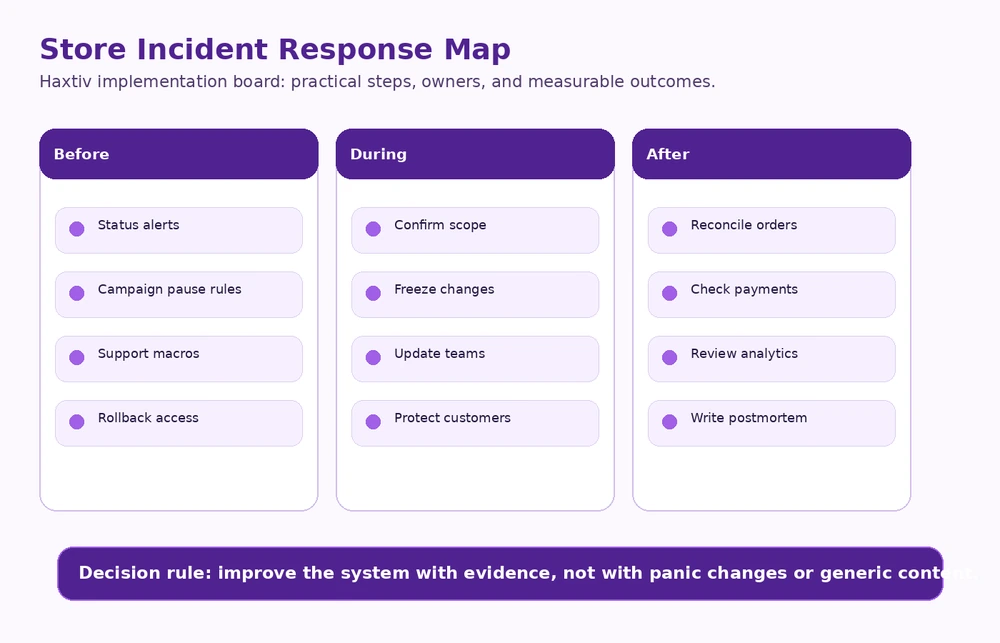
The best outage response is prepared before anything breaks. Subscribe to platform status alerts. Monitor real-user checkout behavior. Track uptime from outside your own office network. Watch payment failures, server errors, abandoned checkout spikes, and support tickets.
Assign roles: incident lead, developer or technical partner, customer support owner, paid media owner, operations or fulfillment owner, and finance or order reconciliation owner. This avoids five people making conflicting decisions.
Prepare short messages for customer support replies, social media updates, email or SMS campaign delays, retail staff notices, internal team updates, and agency escalation. Do not write these during an outage. Draft them calmly in advance.
Paid campaigns should have clear pause rules. If checkout is failing, campaigns should usually pause quickly. If admin is degraded but checkout works, the decision may be different. Define rules by incident type.
For WordPress and WooCommerce, rollback planning is essential. For Shopify, theme rollback, app disabling, and checkout configuration documentation can help store-specific incidents.
During an incident: what to do in the first 30 minutes
The first 30 minutes should be calm and structured. Confirm the issue from more than one source. Check official platform status. Test the customer journey from a clean device or browser. Identify whether the issue affects storefront, checkout, admin, POS, apps, or payments. Assign the incident lead. Pause risky campaigns if checkout or storefront is affected. Notify customer support. Avoid making unrelated changes. Capture screenshots and timestamps. Set the next update time.
The most important rule is simple: do not debug randomly. Random changes can make diagnosis harder, especially if the platform is already unstable.
Communication rules
Customers do not need a technical essay. They need clarity. A good customer-facing message acknowledges the issue, states what is affected if known, explains whether orders are safe, gives a next step, and avoids promises the team cannot control.
Internal communication should be more detailed. Include timestamps, symptoms, status-page links, actions taken, campaign decisions, and owner names. This makes the post-incident review much easier.
For brands working with an external team, Shopify support services should include escalation expectations. Who can be contacted? What is the SLA? What access does the partner need? Which changes require approval?
After an incident: do not skip reconciliation
When the platform recovers, the work is not finished. Check successful orders, failed orders, duplicate orders, abandoned carts, payment captures, refunds, customer support tickets, delayed fulfillment, inventory sync, POS transactions, analytics gaps, campaign spend, conversion-rate drop, email automations, and SMS flows.
This is especially important for stores with subscriptions, B2B orders, large carts, or retail POS. A customer may have tried three times to pay. A payment may have authorized but not created a normal order. An abandoned cart flow may send an awkward email to someone who successfully purchased later.
Incident recovery should include finance, operations, support, and marketing.
Shopify-specific readiness checklist
Subscribe to Shopify status alerts. Document who checks admin, storefront, checkout, and POS. Keep theme rollback procedures available. Document checkout customizations and apps. Maintain a list of critical apps and owners. Prepare paid campaign pause rules. Build customer support macros. Check order reconciliation after recovery. Review app status pages for critical integrations. Keep analytics annotations for platform incidents.
WordPress and WooCommerce readiness checklist
Keep daily backups. Test restore procedures, not only backup creation. Use staging for plugin and theme updates. Monitor PHP errors and database load. Keep payment gateway credentials documented securely. Review WooCommerce scheduled actions. Exclude cart, checkout, and account pages from unsafe caching. Keep security monitoring active. Document plugin ownership. Use <a href="https://haxtiv.com/services/wordpress-maintenance">WordPress maintenance</a> for update governance when the site is revenue-critical.
SEO and conversion considerations
Outages and incidents can affect more than immediate orders. They can create crawl errors, temporary page failures, ad waste, customer distrust, and broken analytics. A short outage is unlikely to destroy SEO by itself, but repeated instability can create confidence problems for users and search systems.
After a major incident, technical teams should review server logs or platform incident windows, Search Console crawl errors, checkout conversion rate, landing-page bounce rate, paid campaign efficiency, Core Web Vitals changes, and customer support themes.
This is why incident readiness overlaps with <a href="https://haxtiv.com/technical-seo-services">technical SEO services</a> and <a href="https://haxtiv.com/conversion-rate-optimization">conversion rate optimization</a>. A resilient store protects visibility and revenue at the same time.
What not to do during an outage
Do not install new apps during a platform incident. Do not change themes randomly. Do not publish vague customer messages. Do not blame the platform before confirming the issue. Do not keep paid traffic running into a broken checkout. Do not delete abandoned carts before reconciliation. Do not skip the postmortem because everything seems fine.
Outages reveal process quality. A mature team gets calmer. An immature team gets louder.
How Haxtiv would scope an incident-readiness sprint
A practical sprint can be completed without redesigning the store. Week one is discovery: platform dependencies, apps, payment gateways, analytics, hosting if WordPress or WooCommerce, campaign channels, support workflows, and store-critical templates. Week two is monitoring and playbook work: status alerts, owner roles, response checklists, support macros, and campaign pause rules. Week three is technical readiness: theme rollback, app ownership, WordPress backups, staging, payment checks, checkout QA, and error monitoring. Week four is rehearsal and documentation: simulate checkout failure, admin degradation, app conflict, and payment issue.
Team responsibilities by role
The founder or ecommerce lead owns customer-impact decisions. The developer or technical partner owns diagnosis and safe technical changes. The paid media owner pauses or resumes campaigns based on checkout health. The support owner prepares customer messaging and tags incident-related tickets. The finance or operations owner reconciles orders, payments, refunds, and fulfillment.
Writing this down matters. In a real incident, people move faster when the decision map is already clear. The playbook should live somewhere accessible outside the store admin, because admin access may be part of the outage.
Budget expectations
Small scoped readiness work can start from $500 when the store only needs documentation, monitoring, and a short technical review. Most serious Shopify, WordPress, or WooCommerce maintenance and incident-readiness projects land between $1,000 and $5,000 depending on app stack, checkout complexity, POS use, analytics, and required support. Larger custom builds, migrations, or fragile WooCommerce rescue projects are priced on demand.
The point is not to buy unnecessary complexity. The point is to make sure the next incident does not become a revenue and customer-support mess.
Editorial conclusion
A store can be beautiful and still be unprepared. A store can have strong sales and still lack a response process. A store can run on Shopify and still need an outage plan. A store can run on WooCommerce and still be resilient if the team manages hosting, updates, backups, and support properly.
The recent Shopify incident is a useful reminder: commerce infrastructure matters most when something breaks. The brands that handle incidents well are not lucky. They are prepared.
Build the playbook before the next outage. Assign owners. Monitor the right systems. Prepare customer messages. Protect paid traffic. Reconcile orders. Review what happened. Then improve the store. That is how ecommerce teams turn incidents from panic into process.
Short answer for busy teams
The useful answer is not "pick the popular option" or "follow the tool your agency prefers." For website strategy, the right decision is the one that supports whether the current website system can support the next stage of growth. That means looking at the business model, the content model, the people who will operate the site, the conversion path, and the technical constraints that will still exist six months after launch.
For marketing and growth teams, the practical test is simple: will this choice improve qualified conversion rate, organic visibility, Core Web Vitals, and editor throughput, or will it only make the launch feel cleaner? Google-friendly content and AI-search-friendly content both reward the same thing here: clear answers backed by real operating judgment. A page should define the problem, explain the trade-offs, show the implementation path, and make the next decision easier for a human reader.
If you remember nothing else from this guide, remember this: do not optimize for a screenshot, a launch presentation, or a single score. Optimize for the way the website will be used every week by customers, editors, search engines, and the team responsible for keeping it accurate.
The decision framework we use in client work
When Haxtiv evaluates website strategy, we do not start with a preferred platform. We start with five questions. Each question exposes a different kind of risk, and together they usually make the right answer obvious.
1. What job must the website do for the business?
Some websites primarily create demand through education, search visibility, expert content, and trust. Others primarily convert demand that already exists through product discovery, pricing, availability, checkout, or booking. The wrong build happens when a team confuses those two jobs.
If the site has to educate buyers before they convert, the content model needs to be strong. If the site has to process product demand, the commerce or booking layer has to be stronger. If both jobs matter, the architecture needs to let each system do what it is best at instead of forcing one platform to pretend it is everything.
2. Who will operate the site after launch?
A website that only developers can improve will stall. A website that lets every editor change everything will drift. The best system gives the internal team enough control to publish quickly while protecting the design system, SEO structure, performance budget, and conversion path.
For website strategy, this is where many projects become expensive later. The launch looks fine, but the operating model is wrong. Editors avoid the CMS, developers become a bottleneck, and the marketing team creates workarounds. Within a year, the site no longer resembles the system that was approved.
3. What content needs to exist for search intent?
Search intent is not just a keyword. It is the shape of the answer a person expects. A comparison query needs trade-offs. A service query needs scope, proof, process, pricing signals, and next steps. A troubleshooting query needs symptoms, causes, order of operations, and verification.
For AI search and answer engines, the content also needs extractable structure. A strong page includes short answers, definitions, decision rules, lists, examples, FAQs, and clear internal links. That does not mean writing robotic blocks for machines. It means writing in a way that a human can scan and a machine can understand without guessing.
4. What has to be measured?
For this topic, the useful measurement set is qualified conversion rate, organic visibility, Core Web Vitals, and editor throughput. Those metrics matter because they connect the technical decision to business outcomes. A site can look better and still perform worse. A faster page can still convert poorly. A migration can preserve traffic but break lead quality. Measurement prevents the team from declaring victory too early.
We prefer before-and-after snapshots by template, not sitewide averages. Sitewide averages hide the problem. A homepage, service page, product page, blog post, location page, and checkout flow all have different jobs. Each deserves its own baseline and its own target.
5. What happens when the site changes?
The best architecture is not the one that survives launch. It is the one that survives the next campaign, the next product line, the next service page, the next redesign request, and the next algorithmic shift. This is why we care so much about content models, reusable components, schema, internal links, and performance budgets.
A website should become easier to improve over time. If every improvement requires fragile manual work, the site is not a system; it is a collection of pages.
What a useful implementation plan looks like
A good implementation plan for website strategy has four layers: discovery, architecture, production, and stabilization. Skipping any layer usually creates rework.
Discovery
Discovery should produce decisions, not a mood board. The team should leave discovery knowing the audience, the priority journeys, the content types, the URL structure, the technical constraints, the measurement plan, and the first version of the internal-link graph.
For WordPress, Shopify, and modern front-end stacks, discovery should include a crawl or platform audit when an existing site is involved. You want to know which pages currently earn impressions, which URLs have links, which templates are slow, which conversion paths work, and which parts of the CMS the team avoids.
Architecture
Architecture turns the strategy into a system. That includes page types, fields, components, navigation, taxonomy, schema, canonical logic, media policy, and editorial permissions. This is where many visually strong sites become weak: they design pages before they design the system those pages belong to.
A strong architecture also includes deletion rules. Not every old page deserves to survive. Some pages should be consolidated, redirected, rewritten, or left out of the new sitemap. The decision should be based on search demand, backlink value, conversion value, content quality, and overlap with stronger pages.
Production
Production should protect the decisions made earlier. Developers should not discover the content model halfway through the build. Designers should not invent one-off modules that the CMS cannot support. SEO should not arrive in the last week asking for headings, schema, links, and redirects.
For website strategy, production quality is visible in details: clean headings, descriptive anchor text, predictable templates, crawlable links, accessible components, image dimensions, structured data, canonical URLs, and copy that answers the query without pretending every visitor is ready to buy.
Stabilization
The first month after launch matters. Search engines recrawl. Users behave differently. Editors find rough edges. Performance data becomes real. Stabilization is where the team fixes what only live usage can reveal.
We watch index coverage, ranking movement, Core Web Vitals, conversion paths, form quality, 404 logs, internal-search terms, and editor feedback. The goal is not to panic over every movement. The goal is to notice the few issues that matter before they become expensive.
Common mistakes to avoid
The most common mistake is treating the website as a launch project instead of an operating system. It feels efficient at the time because it simplifies the decision. In practice, it moves the complexity into launch week or, worse, into the months after launch when the site is already public.
Other mistakes show up often enough that they are worth naming:
- Choosing a platform before mapping the content model.
- Treating Core Web Vitals as a final QA task instead of a build constraint.
- Letting every service, product, or location page use the same copy pattern.
- Rewriting URLs without a redirect and internal-link plan.
- Publishing comparison content that refuses to make a recommendation.
- Adding FAQ schema to weak FAQs instead of improving the actual answers.
- Measuring only traffic instead of qualified traffic, leads, revenue, and task completion.
- Letting the footer carry the internal-link strategy instead of building contextual links into the content.
The fix is not more complexity. The fix is better sequencing. Decide the job of the site, then the content model, then the platform and templates, then the migration plan, then the measurement plan. That order saves more money than almost any optimization tactic.
How this should be written for Google and AI search
Good SEO in 2026 is less about making a page longer and more about making the page complete. Length helps only when it gives the reader more useful decision support. A 4,000-word article that repeats itself is worse than a 1,200-word article that solves the problem. But for complex commercial and technical topics, thin content usually fails because the real answer needs nuance.
For website strategy, a strong page should include:
- A direct answer near the top.
- A clear definition of the problem.
- The situations where each option is best.
- The situations where each option is risky.
- Specific implementation steps.
- A measurement plan.
- Mistakes to avoid.
- FAQs that answer real objections.
- Links to deeper service or resource pages.
This structure helps traditional search because it covers intent thoroughly. It helps AI systems because the page contains concise, quotable answers and clear relationships between entities, actions, risks, and outcomes. Most importantly, it helps humans because it respects their time.
Measurement plan after the decision
Do not wait until the project is finished to define success. For website strategy, we would track qualified conversion rate, organic visibility, Core Web Vitals, and editor throughput. We would also separate leading indicators from lagging indicators.
Leading indicators appear quickly: crawl health, indexability, LCP, INP, CLS, form errors, editor publishing speed, and content completion. Lagging indicators take longer: rankings, organic revenue, lead quality, assisted conversions, retention, and total cost of ownership.
A simple dashboard is enough. Track the metrics by template and by journey. If the homepage improved but service pages declined, the average does not matter. If traffic increased but qualified leads fell, the project did not succeed. If performance improved in Lighthouse but real-user CrUX data stayed poor, the work is not finished.
Quality-control checklist before you publish or launch
Before publishing a page, launching a redesign, or committing to a platform decision, run a final quality-control pass. This is where good teams catch the issues that do not show up in a design review.
First, read the page as a buyer would. Does it answer the main question quickly? Does it explain who the advice is for? Does it say when the recommendation is not the right fit? Helpful content is not afraid to disqualify. If every option sounds equally good, the page is not helping.
Second, read the page as an editor would. Are the headings predictable? Are examples concrete? Are internal links placed where the reader naturally needs the next step? Are important claims supported by process, data, examples, or experience? This is the difference between expert content and decorative content.
Third, read the page as a crawler would. Is there one clear H1? Do H2s describe the actual sections? Are links crawlable? Is schema aligned with visible content? Is the canonical URL correct? Are images sized, described, and useful? Are FAQs genuinely visible on the page rather than added only for structured data?
Finally, read the page as an operator would. Can the team maintain this system next quarter? Can they add another service, product, location, or article without breaking design quality? Can they measure whether the work performed? If the answer is no, the issue is not content length; it is architecture.
Practical next step
If you are making this decision now, write down the constraint first. Is the constraint search visibility, speed, editor control, checkout conversion, compliance, migration risk, design quality, or maintenance cost? Once the constraint is named, the right path is easier to see.
For a second opinion, start with our website strategy and development work. If the decision is connected to a broader website project, also read our process. We can usually tell within one call whether the project needs a focused fix, a redesign, a rebuild, or a smaller scope than expected.
FAQs about website strategy
What is the short answer on website strategy?
The short answer is to make the decision around whether the current website system can support the next stage of growth. The right choice is the one that improves qualified conversion rate, organic visibility, Core Web Vitals, and editor throughput, not the one that sounds best in a tool comparison.
Who should care most about website strategy?
marketing and growth teams should care because this decision affects search visibility, conversion quality, operating cost, and how easily the website can improve after launch.
What is the biggest mistake with website strategy?
The biggest mistake is treating the website as a launch project instead of an operating system. Strong teams validate the decision against user intent, platform constraints, measurement, and the people who will maintain the site.
How should teams measure whether website strategy worked?
Measure qualified conversion rate, organic visibility, Core Web Vitals, and editor throughput. Do not rely on launch-day opinions or lab-only scores; use real user behavior, search data, and conversion outcomes.
Final recommendation
Do the smallest serious version of the work. Not the cheapest version. Not the biggest version. The smallest serious version is the scope that solves the real constraint, protects the site from avoidable search and performance risk, and gives the team a system they can keep improving.
That is the standard we use for Shopify Development, Shopify, Shopify support, Shopify maintenance, WooCommerce, WordPress maintenance, incident response, checkout outage, ecommerce operations, technical SEO, CRO. If the work does not make the site clearer for users, easier for editors, healthier for search engines, and more measurable for the business, it is probably not the right work yet.
Shopify vs WooCommerce Incident Readiness
| Area | Shopify readiness | WooCommerce readiness |
|---|---|---|
| Platform health | Monitor Shopify status, apps, checkout, admin, POS | Monitor hosting, PHP, database, plugins, payment gateways |
| Rollback | Theme versions and app changes | Backups, staging, plugin rollback, restore testing |
| Campaign control | Pause rules for checkout or storefront incidents | Pause rules for checkout, server, or payment incidents |
| Support | Macros for platform incident updates | Macros for site, hosting, or payment issues |
| Post-incident | Order and payment reconciliation | Order, payment, logs, backups, and security review |
Frequently Asked Questions
What should a Shopify store do during an outage?
Can merchants prevent Shopify outages?
What is the highest-risk outage type for ecommerce?
Do WooCommerce stores need outage plans too?
Should paid campaigns be paused during an outage?
What should be checked after recovery?
How often should an incident playbook be reviewed?
How much does incident-readiness work cost?
James Holloway
More about the studio →