WordPress Development
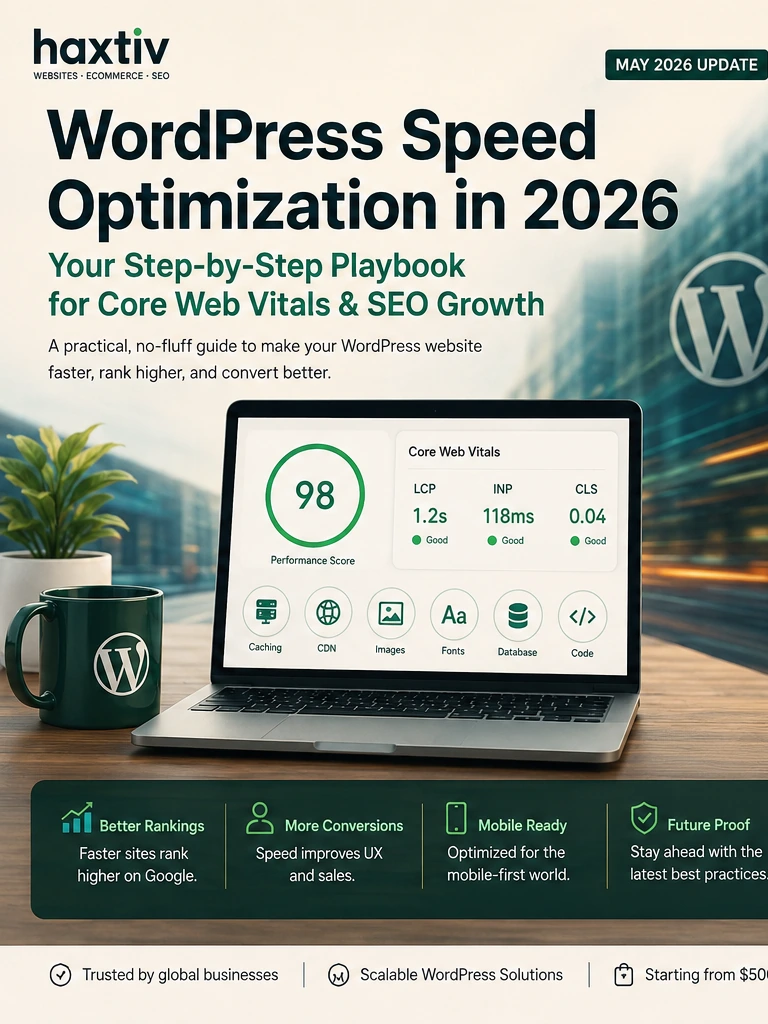
WordPress Speed Optimization Checklist 2026: A Practical Playbook for Core Web Vitals and SEO Growth
A practical 2026 WordPress speed optimization checklist for businesses improving Core Web Vitals, technical SEO, WooCommerce performance, and conversion rates.
WordPress Speed Optimization Checklist 2026: A Practical Playbook for Core Web Vitals and SEO Growth
Key takeaways
- WordPress speed optimization in 2026 is a revenue issue, not only a technical SEO task.
- The best improvements come from template-level measurement, better hosting, caching discipline, media cleanup, plugin governance, and ongoing maintenance.
- Core Web Vitals still matter, but the business goal is not a perfect score. The goal is a faster site that ranks, converts, and stays stable after campaigns and updates.
- Shopify and WordPress performance work now overlap because ecommerce buyers expect fast mobile pages, trustworthy checkout, and clean product information regardless of platform.
- Most small optimization tasks start from $500 when the scope is narrow. Serious WordPress or Shopify performance projects often land between $1,000 and $5,000. Bigger rebuilds are priced on demand.
Why this topic matters right now
Speed used to be a technical afterthought. A team launched the site, checked a few tools, installed a caching plugin, compressed some images, and moved on. That approach is not enough in 2026.
WordPress sites now carry more responsibility. They run service pages, ecommerce stores, membership portals, editorial hubs, lead-generation funnels, booking systems, and product education libraries. Marketing teams add analytics scripts, landing-page builders, chat widgets, review tools, personalization systems, and consent platforms. Designers add animation and visual polish. Developers add integrations. Over time, the site becomes slower even when nobody made one obviously bad decision.
At the same time, buyers have less patience. Google continues to reward fast, usable pages when content quality is comparable. AI search systems need clean, crawlable, structured content. Paid traffic is expensive. Slow mobile pages waste campaigns. Conversion rate suffers when users wait, tap, and nothing happens.
That is why Haxtiv treats performance as part of website operations. The work sits across <a href="https://haxtiv.com/services/wordpress-development">WordPress development</a>, <a href="https://haxtiv.com/services/wordpress-speed-optimization">WordPress speed optimization</a>, <a href="https://haxtiv.com/technical-seo-services">technical SEO services</a>, <a href="https://haxtiv.com/conversion-rate-optimization">conversion rate optimization</a>, and long-term support. It is not a plugin purchase. It is a system.
Start with real templates, not the homepage
The homepage gets too much attention. For many businesses, the pages that matter most are service pages, pricing pages, product pages, category pages, blog articles, checkout pages, forms, and campaign landing pages. A homepage can score well while the money pages perform poorly.
A proper 2026 audit should test page types. For a service business, test the homepage, a core service page, a location page, an article, and the contact form. For WooCommerce, test product pages, category pages, cart, checkout, account pages, and search. For Shopify, test collections, product pages, cart, checkout-related experiences, and landing pages.
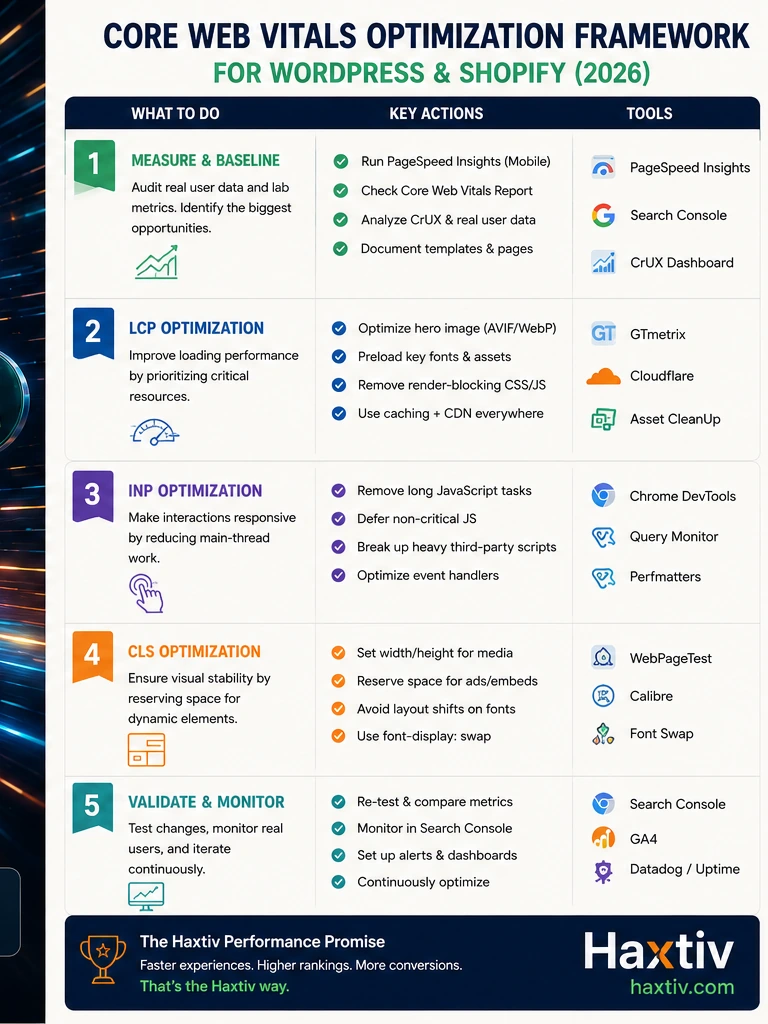
Record LCP, INP, CLS, TTFB, page weight, JavaScript weight, image size, third-party scripts, mobile performance, and conversion role. Then prioritize the templates that affect revenue or leads first.
This is where many cheap speed fixes fail. They improve a single homepage test and ignore the pages users actually rely on.
Step 1: measure before changing anything
Before installing another plugin, establish a baseline. Use PageSpeed Insights, Search Console, CrUX where available, WebPageTest, GTmetrix, and real analytics data. Lab tests are useful, but field data matters more because it reflects real users, devices, and networks.
Create a simple performance sheet with:
- URL
- template type
- traffic value
- conversion role
- LCP
- INP
- CLS
- TTFB
- total page weight
- key scripts
- suspected bottleneck
This makes the work more honest. It also protects the team from optimizing low-value pages first.
Step 2: fix hosting and server response
Hosting is still one of the biggest WordPress performance bottlenecks. A weak server makes every other improvement harder.
A serious WordPress setup should include modern PHP, OPcache, enough memory, good database performance, object caching, CDN support, staging, backups, and a host that understands dynamic WordPress or WooCommerce traffic. For WooCommerce, object caching and database performance become even more important because carts, sessions, orders, coupons, and account pages create dynamic work.
If TTFB is consistently poor, do not start with animation cleanup. Fix infrastructure first. A slow backend makes the entire site feel slow regardless of frontend improvements.
Haxtiv’s <a href="https://haxtiv.com/website-maintenance-services">website maintenance services</a> often start with this kind of environment review because performance and support are connected.
Step 3: reduce plugin overlap
Plugin count is not the best metric. Plugin overlap is the real issue.
A site can run several well-built plugins safely. It can also run a small number of heavy plugins badly. Common problems include duplicate SEO tools, multiple analytics injectors, several popup systems, abandoned sliders, overlapping form builders, unused add-ons, and old optimization plugins fighting each other.
Create a plugin register. Document what each plugin does, who owns it, where it loads assets, what database tables it creates, and whether it affects checkout, forms, search, security, or analytics. Then classify plugins as keep, remove, replace, consolidate, or rebuild as lightweight custom code.
For ecommerce stores, review plugins with extra care. A plugin that affects checkout, payments, shipping, tax, subscriptions, product options, or inventory should never be removed casually. Test in staging.
Step 4: optimize media before upload
Images remain one of the simplest and most repeated causes of slow WordPress sites. The fix is not to make images ugly. The fix is to build a media process.
Use WebP or AVIF where appropriate. Resize images before upload. Use responsive image sizes. Compress product photos and editorial visuals. Reserve image dimensions to avoid layout shift. Lazy-load images below the fold, but avoid delaying the main visual that defines the page.
For WooCommerce stores, product images deserve special rules. Every product should have consistent dimensions, optimized file size, useful alt text, and clean filenames. This helps performance, product discovery, and shopping confidence.
Haxtiv’s <a href="https://haxtiv.com/services/woocommerce-development">WooCommerce development</a> projects often include media governance because stores become slow again when product teams upload unoptimized assets every week.
Step 5: clean CSS, fonts, and JavaScript
Modern WordPress themes and builders can ship a lot of frontend code. Some of it is needed. Much of it is not.
Common issues include unused CSS, too many font families, render-blocking scripts, animation libraries loaded on every page, large icon sets, third-party widgets, and page-builder assets that load globally.
Improve performance by using font-display swap, limiting font weights, hosting fonts locally when appropriate, removing unused CSS, deferring non-critical scripts, conditionally loading plugin assets, and reducing animation where it does not improve conversion.
If the site uses Elementor, Divi, Bricks, Gutenberg, or another builder, audit the actual output. Builders are not automatically bad. Poor builder discipline is bad. A clean builder implementation can perform well. A messy one becomes expensive to maintain.
Step 6: improve ecommerce pages, not just scores
For ecommerce, speed and conversion are inseparable. A product page should load quickly, explain the product clearly, show useful images, handle variants smoothly, and make buying easy. A cart should update predictably. Checkout should feel stable on mobile.
For Shopify teams, <a href="https://haxtiv.com/services/shopify-development">Shopify development</a> and <a href="https://haxtiv.com/services/shopify-speed-optimization">Shopify speed optimization</a> often focus on theme code, app scripts, product media, collection filters, and checkout-adjacent UX. For WooCommerce teams, the same logic applies, but plugin and hosting decisions matter more.
The business metric is not only page score. Track add-to-cart rate, checkout abandonment, paid landing-page conversion, mobile revenue, lead form completion, and bounce rate by template.
Step 7: connect performance with technical SEO
Technical SEO and performance now overlap heavily. A slow site can reduce crawl efficiency, make rendering harder, create poor engagement, and weaken the experience of users arriving from search. A fast site with weak content still fails, but slow pages make good content work harder.
Review sitemap health, indexable pages, canonical rules, structured data, internal links, heading structure, and content usefulness alongside speed. For local service businesses, industry pages, and content-led brands, performance supports the entire SEO system.
That is why performance should be part of any serious <a href="https://haxtiv.com/technical-seo-services">technical SEO</a> audit. It is not separate from search. It is part of the delivery layer.
Step 8: optimize the database carefully
WordPress databases collect revisions, spam comments, transients, logs, plugin tables, and abandoned data. WooCommerce adds orders, sessions, analytics records, scheduled actions, and product metadata. Cleanup can help, but reckless cleanup can break reporting, orders, subscriptions, or integrations.
Work from a backup. Test in staging. Identify large tables. Review autoloaded options. Clean expired data safely. Limit revisions. Remove plugin tables only after confirming the plugin is gone and the data is not needed.
Database optimization is not glamorous, but it often improves admin speed, search, order management, and background jobs.
Step 9: make maintenance the operating model
Performance decays because websites change. A new campaign adds scripts. A new designer uploads large images. A new marketing tool injects JavaScript. A plugin update changes output. A seasonal landing page adds a video background.
The solution is not to optimize once and forget. Create operating rules:
- Test important templates monthly.
- Review scripts before campaigns.
- Compress images before upload.
- Use staging for plugin updates.
- Monitor Core Web Vitals in Search Console.
- Review slow pages after redesigns.
- Remove campaign tools when campaigns end.
This is why long-term care is often cheaper than emergency repair.
Budget expectations
Small scoped improvements can start from $500. Examples include a focused image cleanup, plugin review, or limited template audit. Most serious WordPress or Shopify speed projects land between $1,000 and $5,000 depending on hosting, plugin complexity, ecommerce risk, builder output, and the number of templates.
Larger rebuilds, migrations, headless builds, WooCommerce modernization, and Shopify Plus work should be priced on demand. The scope depends on data, integrations, checkout, SEO, content, and operational risk.
The honest advice: do not buy a rebuild when a focused cleanup will solve the issue. Do not keep buying small fixes when the foundation needs rebuilding.
2026 WordPress speed checklist
Use this before your next redesign or campaign:
- Audit templates, not only the homepage.
- Fix hosting and TTFB before minor CSS work.
- Remove duplicate plugins and scripts.
- Optimize images before upload.
- Use WebP or AVIF where appropriate.
- Limit fonts and font weights.
- Defer non-critical JavaScript.
- Condition-load plugin assets.
- Clean database growth safely.
- Test mobile product and lead forms.
- Monitor Core Web Vitals monthly.
- Connect performance to revenue and leads.
Editorial conclusion
WordPress speed optimization in 2026 is not about chasing a perfect PageSpeed score. It is about making the website easier to use, easier to crawl, easier to maintain, and more likely to convert.
The best-performing sites are usually not the most complicated. They are disciplined. They use strong hosting, clean templates, controlled plugins, optimized media, stable layouts, and a maintenance rhythm that prevents performance decay.
For service businesses, ecommerce stores, and content-led brands, that discipline is now a competitive advantage. If your site is slow, start with measurement, fix the highest-impact templates, and build performance into the way the team operates.
If you want a senior review before investing in speed work, you can <a href="https://haxtiv.com/book-a-call">book a call with Haxtiv</a> and get a practical recommendation before committing to a rebuild.
What to fix first if the budget is limited
When the budget is limited, do not try to fix every metric at once. Start with the highest-value templates and the most obvious friction. For a lead-generation site, that usually means service pages, location pages, forms, and article templates. For WooCommerce, it usually means category pages, product pages, cart, and checkout. For Shopify, it usually means collections, product detail pages, app scripts, and theme sections that appear on many pages.
The first sprint should identify whether the issue is infrastructure, media, scripts, plugins, builder output, database load, or content structure. Once the main cause is clear, the work becomes easier to price and easier to defend. A small scoped fix might remove unused scripts, optimize product media, or repair a slow form. A larger sprint might rebuild templates, simplify a plugin stack, change hosting, or redesign the mobile product page.
This is why Haxtiv avoids vague speed packages. A site with poor hosting needs different work from a site with great hosting but heavy scripts. A WooCommerce store with checkout friction needs different work from a brochure site with oversized images. Diagnosis protects the client from buying the wrong fix.
How to keep a fast site from becoming slow again
The hard part is not only making the site fast once. The hard part is keeping it fast after real teams use it. Designers upload campaign graphics. Marketers add pixels. Editors publish long pages. Product teams upload new images. Developers install integrations. Agencies test tools. Every small addition can be reasonable, but together they can make the site slow again.
Create simple rules. New images should be compressed before upload. New plugins should have an owner and a reason. New scripts should load only where needed. New landing pages should be tested on mobile. New builder sections should be reviewed for frontend weight. New ecommerce tools should be tested against checkout and conversion.
A fast website is not a frozen website. It is a governed website. The best teams can keep shipping campaigns, products, articles, and design updates without letting performance collapse. That operating habit is what separates a one-time cleanup from a serious growth platform.
How this connects to Shopify and WooCommerce
WordPress performance is not isolated from ecommerce anymore. Many businesses use WordPress for content and Shopify for commerce, or WordPress and WooCommerce together. Some brands run a Shopify store with a WordPress editorial hub. Others use WooCommerce because content and commerce need to live in the same system.
The performance principles remain similar. Test the pages that make money. Control scripts. Compress media. Keep templates simple. Watch mobile behavior. Maintain clean product data. Avoid app or plugin overlap. Measure conversion, not only speed scores.
The platform decision matters, but the operating discipline matters more. A well-built WooCommerce store can beat a messy Shopify theme. A well-governed Shopify store can outperform a bloated WordPress build. The winner is usually the team that treats performance as part of weekly operations.
When a redesign is the right answer
Sometimes optimization is not enough. If the theme is old, the builder output is unmanageable, the plugin stack is fragile, and every change creates new issues, a redesign or rebuild may be cheaper than repeated patching. The decision should be based on evidence, not frustration.
A rebuild is worth considering when important templates cannot be made fast, editors avoid the CMS because it is too confusing, ecommerce flows depend on too many fragile plugins, or the site cannot support future campaigns without heavy developer involvement. In that case, performance work should be part of the redesign brief from day one. It should define the theme, builder rules, image workflow, plugin policy, measurement plan, and maintenance owner before visual work begins. Without that clarity, a new design can repeat the same slow patterns and force the business to pay twice for avoidable problems. A measured redesign is cheaper than repeated emergency cleanup after launch. Speed should stay visible in planning meetings weekly.
Short answer for busy teams
The useful answer is not "pick the popular option" or "follow the tool your agency prefers." For website strategy, the right decision is the one that supports whether the current website system can support the next stage of growth. That means looking at the business model, the content model, the people who will operate the site, the conversion path, and the technical constraints that will still exist six months after launch.
For marketing and growth teams, the practical test is simple: will this choice improve qualified conversion rate, organic visibility, Core Web Vitals, and editor throughput, or will it only make the launch feel cleaner? Google-friendly content and AI-search-friendly content both reward the same thing here: clear answers backed by real operating judgment. A page should define the problem, explain the trade-offs, show the implementation path, and make the next decision easier for a human reader.
If you remember nothing else from this guide, remember this: do not optimize for a screenshot, a launch presentation, or a single score. Optimize for the way the website will be used every week by customers, editors, search engines, and the team responsible for keeping it accurate.
The decision framework we use in client work
When Haxtiv evaluates website strategy, we do not start with a preferred platform. We start with five questions. Each question exposes a different kind of risk, and together they usually make the right answer obvious.
1. What job must the website do for the business?
Some websites primarily create demand through education, search visibility, expert content, and trust. Others primarily convert demand that already exists through product discovery, pricing, availability, checkout, or booking. The wrong build happens when a team confuses those two jobs.
If the site has to educate buyers before they convert, the content model needs to be strong. If the site has to process product demand, the commerce or booking layer has to be stronger. If both jobs matter, the architecture needs to let each system do what it is best at instead of forcing one platform to pretend it is everything.
2. Who will operate the site after launch?
A website that only developers can improve will stall. A website that lets every editor change everything will drift. The best system gives the internal team enough control to publish quickly while protecting the design system, SEO structure, performance budget, and conversion path.
For website strategy, this is where many projects become expensive later. The launch looks fine, but the operating model is wrong. Editors avoid the CMS, developers become a bottleneck, and the marketing team creates workarounds. Within a year, the site no longer resembles the system that was approved.
3. What content needs to exist for search intent?
Search intent is not just a keyword. It is the shape of the answer a person expects. A comparison query needs trade-offs. A service query needs scope, proof, process, pricing signals, and next steps. A troubleshooting query needs symptoms, causes, order of operations, and verification.
For AI search and answer engines, the content also needs extractable structure. A strong page includes short answers, definitions, decision rules, lists, examples, FAQs, and clear internal links. That does not mean writing robotic blocks for machines. It means writing in a way that a human can scan and a machine can understand without guessing.
4. What has to be measured?
For this topic, the useful measurement set is qualified conversion rate, organic visibility, Core Web Vitals, and editor throughput. Those metrics matter because they connect the technical decision to business outcomes. A site can look better and still perform worse. A faster page can still convert poorly. A migration can preserve traffic but break lead quality. Measurement prevents the team from declaring victory too early.
We prefer before-and-after snapshots by template, not sitewide averages. Sitewide averages hide the problem. A homepage, service page, product page, blog post, location page, and checkout flow all have different jobs. Each deserves its own baseline and its own target.
5. What happens when the site changes?
The best architecture is not the one that survives launch. It is the one that survives the next campaign, the next product line, the next service page, the next redesign request, and the next algorithmic shift. This is why we care so much about content models, reusable components, schema, internal links, and performance budgets.
A website should become easier to improve over time. If every improvement requires fragile manual work, the site is not a system; it is a collection of pages.
What a useful implementation plan looks like
A good implementation plan for website strategy has four layers: discovery, architecture, production, and stabilization. Skipping any layer usually creates rework.
Discovery
Discovery should produce decisions, not a mood board. The team should leave discovery knowing the audience, the priority journeys, the content types, the URL structure, the technical constraints, the measurement plan, and the first version of the internal-link graph.
For WordPress, Shopify, and modern front-end stacks, discovery should include a crawl or platform audit when an existing site is involved. You want to know which pages currently earn impressions, which URLs have links, which templates are slow, which conversion paths work, and which parts of the CMS the team avoids.
Architecture
Architecture turns the strategy into a system. That includes page types, fields, components, navigation, taxonomy, schema, canonical logic, media policy, and editorial permissions. This is where many visually strong sites become weak: they design pages before they design the system those pages belong to.
A strong architecture also includes deletion rules. Not every old page deserves to survive. Some pages should be consolidated, redirected, rewritten, or left out of the new sitemap. The decision should be based on search demand, backlink value, conversion value, content quality, and overlap with stronger pages.
Production
Production should protect the decisions made earlier. Developers should not discover the content model halfway through the build. Designers should not invent one-off modules that the CMS cannot support. SEO should not arrive in the last week asking for headings, schema, links, and redirects.
For website strategy, production quality is visible in details: clean headings, descriptive anchor text, predictable templates, crawlable links, accessible components, image dimensions, structured data, canonical URLs, and copy that answers the query without pretending every visitor is ready to buy.
Stabilization
The first month after launch matters. Search engines recrawl. Users behave differently. Editors find rough edges. Performance data becomes real. Stabilization is where the team fixes what only live usage can reveal.
We watch index coverage, ranking movement, Core Web Vitals, conversion paths, form quality, 404 logs, internal-search terms, and editor feedback. The goal is not to panic over every movement. The goal is to notice the few issues that matter before they become expensive.
Common mistakes to avoid
The most common mistake is treating the website as a launch project instead of an operating system. It feels efficient at the time because it simplifies the decision. In practice, it moves the complexity into launch week or, worse, into the months after launch when the site is already public.
Other mistakes show up often enough that they are worth naming:
- Choosing a platform before mapping the content model.
- Treating Core Web Vitals as a final QA task instead of a build constraint.
- Letting every service, product, or location page use the same copy pattern.
- Rewriting URLs without a redirect and internal-link plan.
- Publishing comparison content that refuses to make a recommendation.
- Adding FAQ schema to weak FAQs instead of improving the actual answers.
- Measuring only traffic instead of qualified traffic, leads, revenue, and task completion.
- Letting the footer carry the internal-link strategy instead of building contextual links into the content.
The fix is not more complexity. The fix is better sequencing. Decide the job of the site, then the content model, then the platform and templates, then the migration plan, then the measurement plan. That order saves more money than almost any optimization tactic.
How this should be written for Google and AI search
Good SEO in 2026 is less about making a page longer and more about making the page complete. Length helps only when it gives the reader more useful decision support. A 4,000-word article that repeats itself is worse than a 1,200-word article that solves the problem. But for complex commercial and technical topics, thin content usually fails because the real answer needs nuance.
For website strategy, a strong page should include:
- A direct answer near the top.
- A clear definition of the problem.
- The situations where each option is best.
- The situations where each option is risky.
- Specific implementation steps.
- A measurement plan.
- Mistakes to avoid.
- FAQs that answer real objections.
- Links to deeper service or resource pages.
This structure helps traditional search because it covers intent thoroughly. It helps AI systems because the page contains concise, quotable answers and clear relationships between entities, actions, risks, and outcomes. Most importantly, it helps humans because it respects their time.
Measurement plan after the decision
Do not wait until the project is finished to define success. For website strategy, we would track qualified conversion rate, organic visibility, Core Web Vitals, and editor throughput. We would also separate leading indicators from lagging indicators.
Leading indicators appear quickly: crawl health, indexability, LCP, INP, CLS, form errors, editor publishing speed, and content completion. Lagging indicators take longer: rankings, organic revenue, lead quality, assisted conversions, retention, and total cost of ownership.
A simple dashboard is enough. Track the metrics by template and by journey. If the homepage improved but service pages declined, the average does not matter. If traffic increased but qualified leads fell, the project did not succeed. If performance improved in Lighthouse but real-user CrUX data stayed poor, the work is not finished.
Quality-control checklist before you publish or launch
Before publishing a page, launching a redesign, or committing to a platform decision, run a final quality-control pass. This is where good teams catch the issues that do not show up in a design review.
First, read the page as a buyer would. Does it answer the main question quickly? Does it explain who the advice is for? Does it say when the recommendation is not the right fit? Helpful content is not afraid to disqualify. If every option sounds equally good, the page is not helping.
Second, read the page as an editor would. Are the headings predictable? Are examples concrete? Are internal links placed where the reader naturally needs the next step? Are important claims supported by process, data, examples, or experience? This is the difference between expert content and decorative content.
Third, read the page as a crawler would. Is there one clear H1? Do H2s describe the actual sections? Are links crawlable? Is schema aligned with visible content? Is the canonical URL correct? Are images sized, described, and useful? Are FAQs genuinely visible on the page rather than added only for structured data?
Finally, read the page as an operator would. Can the team maintain this system next quarter? Can they add another service, product, location, or article without breaking design quality? Can they measure whether the work performed? If the answer is no, the issue is not content length; it is architecture.
Practical next step
If you are making this decision now, write down the constraint first. Is the constraint search visibility, speed, editor control, checkout conversion, compliance, migration risk, design quality, or maintenance cost? Once the constraint is named, the right path is easier to see.
For a second opinion, start with our website strategy and development work. If the decision is connected to a broader website project, also read our process. We can usually tell within one call whether the project needs a focused fix, a redesign, a rebuild, or a smaller scope than expected.
FAQs about website strategy
What is the short answer on website strategy?
The short answer is to make the decision around whether the current website system can support the next stage of growth. The right choice is the one that improves qualified conversion rate, organic visibility, Core Web Vitals, and editor throughput, not the one that sounds best in a tool comparison.
Who should care most about website strategy?
marketing and growth teams should care because this decision affects search visibility, conversion quality, operating cost, and how easily the website can improve after launch.
What is the biggest mistake with website strategy?
The biggest mistake is treating the website as a launch project instead of an operating system. Strong teams validate the decision against user intent, platform constraints, measurement, and the people who will maintain the site.
How should teams measure whether website strategy worked?
Measure qualified conversion rate, organic visibility, Core Web Vitals, and editor throughput. Do not rely on launch-day opinions or lab-only scores; use real user behavior, search data, and conversion outcomes.
Final recommendation
Do the smallest serious version of the work. Not the cheapest version. Not the biggest version. The smallest serious version is the scope that solves the real constraint, protects the site from avoidable search and performance risk, and gives the team a system they can keep improving.
That is the standard we use for WordPress Development, WordPress, Core Web Vitals, Website Speed Optimization, Technical SEO, WooCommerce, Elementor, Shopify, CRO, Performance. If the work does not make the site clearer for users, easier for editors, healthier for search engines, and more measurable for the business, it is probably not the right work yet.
WordPress Speed Optimization Priorities in 2026
| Area | What to check | Why it matters |
|---|---|---|
| Hosting | PHP, TTFB, object cache, database performance | Weak infrastructure slows every page |
| Plugins | Overlap, unused tools, global assets | Plugin sprawl creates frontend and admin drag |
| Media | Image size, format, dimensions, lazy loading | Images are often the largest page assets |
| JavaScript | Third-party scripts, builders, tracking | Heavy JS hurts INP and mobile UX |
| Maintenance | Monitoring, staging, update process | Performance decays without ownership |
Frequently Asked Questions
What is the most important WordPress speed metric in 2026?
Can a caching plugin fix WordPress speed?
Is Elementor bad for performance?
How often should WordPress speed be audited?
Does speed optimization help SEO?
How much does WordPress speed optimization cost?
Should WooCommerce stores optimize differently?
What is the biggest mistake businesses make?
Marco Linder
More about the studio →